
DStv Explora vs Explora Ultra: Which Decoder Should You Choose?
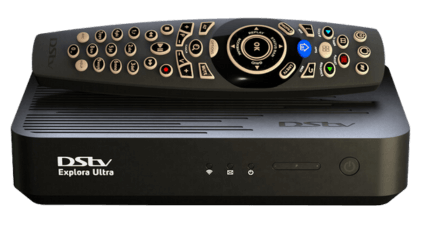
If you are trying to decide between the DStv Explora and the Explora Ultra, here is the short answer: the Explora Ultra is the better decoder if you have a reliable internet connection and want 4K picture quality with built-in streaming apps, while the standard Explora remains an excellent choice for households that want powerful PVR features without needing internet connectivity. We install both models across Sandton, so let us walk you through the full comparison to help you pick the right one.
What Is the DStv Explora?
The DStv Explora has been the flagship decoder for years, and for good reason. It turned the way South Africans watch television on its head by introducing a proper personal video recorder (PVR) experience to MultiChoice DStv subscribers.
Key Explora Features
- HD Recording (PVR) -- Record up to 220 hours of content on the built-in hard drive so you never miss a show.
- Pause and Rewind Live TV -- Step away from the couch without missing a moment. Pause what you are watching and pick up right where you left off.
- Series Link -- Set it once and the Explora automatically records every episode of your favourite series, even across season changes.
- Catch Up -- Missed something from the past few days? Catch Up lets you scroll back through select channels and watch programmes on demand.
- BoxOffice -- Rent the latest movies directly from your remote without leaving the sofa.
For many households in Sandton, these features are more than enough. If your main concern is recording shows, pausing live sport, and having a reliable viewing experience, the Explora delivers exactly that. If you need help getting it set up properly, take a look at our full range of installation services.
What Is the DStv Explora Ultra?
The Explora Ultra takes everything the standard Explora does and adds a layer of smart TV functionality on top. Think of it as an Explora with a streaming box built right in.
Key Explora Ultra Features
- Everything the Explora Offers -- PVR recording, pause/rewind, Series Link, Catch Up, and BoxOffice are all still there.
- 4K Ultra HD -- Watch supported content in stunning 4K resolution. Sport, nature documentaries, and blockbuster films look noticeably sharper.
- Built-in Streaming Apps -- Access Netflix, YouTube, Disney+, and Showmax directly from the decoder (see the DStv support page for app setup help). No need for a separate streaming stick or smart TV.
- Voice Control -- Use the voice-enabled remote to search for content, change channels, and navigate menus hands-free.
- Built-in WiFi -- Connect to your home network wirelessly. No ethernet cable needed.
- HOME Button and Smarter Recommendations -- The HOME button gives you a single screen that surfaces recommendations from both your DStv channels and your streaming apps, making it far easier to find something to watch.
The Explora Ultra essentially combines your satellite decoder and your streaming device into one unit, which keeps your setup clean and your remote count low.
Side-by-Side Comparison
Here is a quick reference table so you can compare the two decoders at a glance:
| Feature | DStv Explora | DStv Explora Ultra |
|---|---|---|
| HD Channels | Yes | Yes |
| 4K Ultra HD | No | Yes |
| PVR Recording | Yes (220+ hours) | Yes (220+ hours) |
| Pause/Rewind Live TV | Yes | Yes |
| Series Link | Yes | Yes |
| Catch Up | Yes | Yes |
| BoxOffice | Yes | Yes |
| Netflix, Disney+, YouTube, Showmax | No | Yes (built-in) |
| Voice Control | No | Yes |
| Built-in WiFi | No | Yes |
| HOME Button Recommendations | No | Yes |
| Internet Required | Optional (for Catch Up) | Required for streaming features |
Installation Pricing in Sandton
The cost difference between the two decoders is something to factor in. The standard Explora installation is more affordable, while the Explora Ultra commands a premium thanks to the 4K capability and streaming hardware built in.
Typical pricing for a new installation in Sandton includes the decoder, dish, cabling, and professional setup. Exact costs depend on your specific situation -- how many TVs you need connected, whether you want an Extra View setup, and the complexity of the cabling run. We always provide a clear quote before we start any work. Give us a call on 077 454 4032 or send a WhatsApp to get a personalised price for your home.
Who Should Choose the Standard Explora?
The Explora is the right pick if:
- You do not have a fast or stable internet connection at home.
- You are primarily interested in satellite TV, recording, and time-shifting live broadcasts.
- You already have a separate streaming device (Apple TV, Chromecast, Fire Stick) and do not need another one.
- You want to keep your upfront costs lower.
- Your TV does not support 4K, so the Ultra HD benefit would go to waste.
Who Should Choose the Explora Ultra?
The Explora Ultra makes sense if:
- You have uncapped or high-speed fibre internet at home (common across estates and complexes in Sandton).
- You subscribe to Netflix, Disney+, Showmax, or regularly watch YouTube and want everything on one device.
- You own a 4K television and want to see content at its best.
- You like the idea of voice search and a single interface for all your entertainment.
- You want fewer devices and remotes cluttering your TV cabinet.
Many of our clients in Sandton have excellent fibre connectivity, which makes the Explora Ultra a natural fit. The streaming apps work beautifully when your internet is solid, and the 4K sport experience is genuinely impressive.
We Install Both Decoders Across Sandton
Whether you go with the Explora or the Explora Ultra, our team handles the full installation professionally. That includes dish alignment, cabling, decoder setup, signal optimisation, and making sure your picture quality is perfect before we leave. If you run into any issues down the line, our troubleshooting guide covers the most common problems, and we are always a phone call away for anything more involved.
Ready to get started? Contact us today, call 077 454 4032, or send us a WhatsApp message. We will help you choose the right decoder and get it installed at a time that suits you.
Frequently Asked Questions
Can I upgrade from an Explora to an Explora Ultra?
Yes, you can. We handle Explora to Explora Ultra upgrades across Sandton. The process involves swapping out the decoder and, in some cases, updating the LNB on your dish to support the 4K signal. Your existing DStv subscription and recordings library will need to be set up fresh on the new unit, but we take care of everything during the installation. Call us on 077 454 4032 to arrange an upgrade.
Do I need internet for the DStv Explora Ultra to work?
The Explora Ultra works perfectly for satellite TV without internet -- you will still get all your DStv channels, PVR recording, pause/rewind, and Series Link. However, the streaming apps (Netflix, Disney+, YouTube, Showmax), voice control, and the richer HOME recommendations all require an active internet connection. We recommend at least a 10 Mbps line for smooth streaming, and faster if you plan to watch in 4K.
Is the Explora Ultra worth the extra cost?
It depends on your situation. If you already pay for streaming subscriptions and have good internet, the Explora Ultra consolidates everything into one device and gives you a noticeably better picture with 4K. That convenience and quality improvement is well worth it for most households. If you do not stream and your TV is not 4K, you will be perfectly happy with the standard Explora and can save some money on the installation.
Need Help with Your DStv?
Our accredited installers provide same-day service across Sandton. Call us for a free, no-obligation quote.